Shopify metafields and metaobjects explained
Default Shopify fields stop at title, description, price, and media. Metafields and metaobjects are how merchants add structured custom data—so themes, apps, filters, and marketplaces can use the facts your catalog actually needs.
Why Shopify stores need custom data
Growing catalogs quickly outgrow stock Admin fields. Merchants need materials, fit notes, care guides, certifications, FAQs, size charts, and channel attributes that do not fit Title or Description alone.
Shopify metafields and metaobjects give that data a typed home—searchable in Admin, addressable in Online Store 2.0 themes, and readable by apps and integrations—without stuffing everything into tags or HTML.
- Richer product pages and PDP content without hard-coding every SKU
- Consistent attributes for filters, feeds, and category-scoped fields
- Cleaner handoffs for agencies and bulk catalog work
What are Shopify metafields?
A Shopify metafield is a custom data field attached to a resource such as a product, variant, collection, customer, order, page, blog, article, or the shop. Think of it as one named attribute that belongs to that item.
Each metafield is addressed by a namespace and key, holds a typed value (text, number, date, file, reference, and more), and is ideally backed by a metafield definition so Admin shows the right input and validations.
- Best for values that belong to one product or resource
- Common uses: subtitle, care copy, warranty months, origin country, internal ops flags
- Definitions keep names and types consistent across the catalog
What are Shopify metaobjects?
A Shopify metaobject is a reusable content type with its own fields—closer to a small content model than a single product attribute. Merchants create a definition (the schema), then create entries (the records).
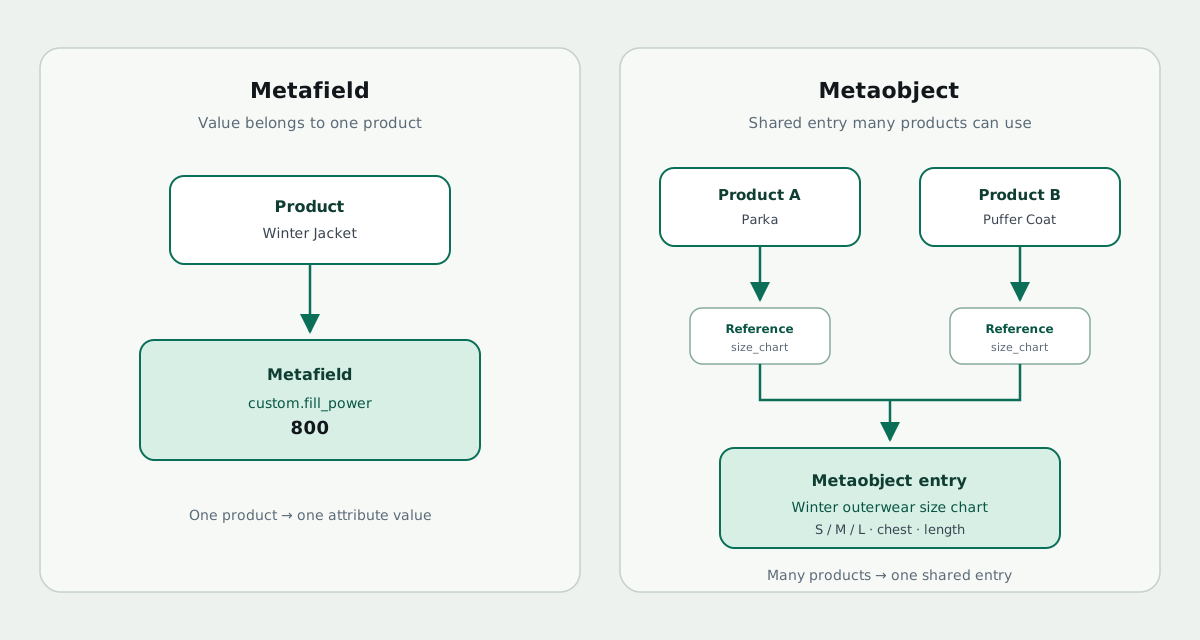
Products (and other resources) link to those entries through metafields typed as metaobject references. One size-chart or brand-story entry can power many products; edit the entry once and every reference stays current.
- Best for multi-field content you reuse across the catalog
- Common uses: size charts, ingredient panels, designer bios, lookbooks, material libraries
- Pairs with reference metafields so products point at shared entries
Metafields vs metaobjects: which should you use?
Use a metafield when the answer is unique to that product or resource. Use a metaobject when the same structured block should appear on many products—or when the content needs several fields of its own.
- Metafield — “This jacket’s fill power is 800.”
- Metaobject — “Winter outerwear size chart” shared by an entire collection
- Reference metafield — the product field that selects which size-chart entry to use
How custom data reaches the storefront
Creating metafields or metaobject entries in Admin does not automatically show them to shoppers. Online Store 2.0 themes typically connect values through the theme editor (dynamic sources or app blocks). Liquid remains available for custom themes.
Plan the data model first (definitions and references), then wire display. That order avoids orphan fields and broken theme settings after migrations.
From “fields exist” to catalog readiness
Many stores have metafield definitions but incomplete coverage—products missing values, empty references, or no Standard Product Taxonomy category. Completeness matters for filters, channel feeds, and AI-assisted shopping experiences that rely on structured facts.
Metafield Editor+Data Doctor combines everyday metafield editing and CSV with Product Data Health scans and Metaobject Studio (Pro) so merchants can find gaps, then fix them in the same app.
- Edit and search metafields in Shopify Admin
- Bulk CSV import/export for catalog-scale updates
- Free metafield coverage scans on every plan; full Data Doctor and Studio on Pro
FAQ: Shopify metafields and metaobjects
Are metafields only for products?
No. They can attach to variants, collections, customers, orders, content resources, and the shop—plan availability depends on your Metafield Editor+Data Doctor subscription.
Do I need metaobjects if I already use metafields?
Only when you need reusable multi-field records. Many catalogs start with product metafields and add metaobjects when the same block repeats across SKUs.
Can I migrate custom data in bulk?
Yes—CSV import/export is built for migrations and agency handoffs; pair exports with Health scan downloads when closing coverage gaps.
Related reading
Try it in Shopify Admin
Install Metafield Editor+Data Doctor and run Health scans, manage metaobjects, or import metafields with CSV.